
Download X-Mouse Button Control – Free Mouse Customization Tool for Windows
Revolutionize Your Mouse Experience with X-Mouse Button Control
If you’ve ever felt limited by your mouse’s default functions, X-Mouse Button Control (XMBC) is the solution you’ve been waiting for. This free, lightweight utility transforms your standard mouse into a powerful productivity and gaming tool by unlocking the full potential of side buttons, scroll wheels, and even the right-click function. Designed specifically for Windows, XMBC allows users to reassign actions to any mouse button, enabling everything from quick application launches to complex macro sequences.
Whether you're a graphic designer, programmer, gamer, or just someone who wants to streamline their workflow, XMBC puts unparalleled control in your hands. The software is completely safe to download and install—virus-free, lightweight, and regularly updated to ensure compatibility with modern Windows versions. One of its standout features is context-aware customization: you can assign different behaviors to the same mouse button depending on which application or window you're using.
For example, pressing a side button in your web browser could navigate back, while the same button in a video editing app might switch between tools. This level of adaptability makes XMBC far more versatile than basic mouse drivers. With support for Windows 7 through 11 and both 32-bit and 64-bit systems, XMBC is accessible to a wide range of users.
It also supports advanced functions like Flip3D in Windows Vista, Metro UI navigation in Windows 8, and virtual desktop switching in Windows 10 and 11. The installation process is straightforward—just run the executable, agree to the license, and let the installer detect your system architecture. Once installed, XMBC runs quietly in the system tray, ready to be accessed at any time.
Advanced Features and Customization Options for Power Users
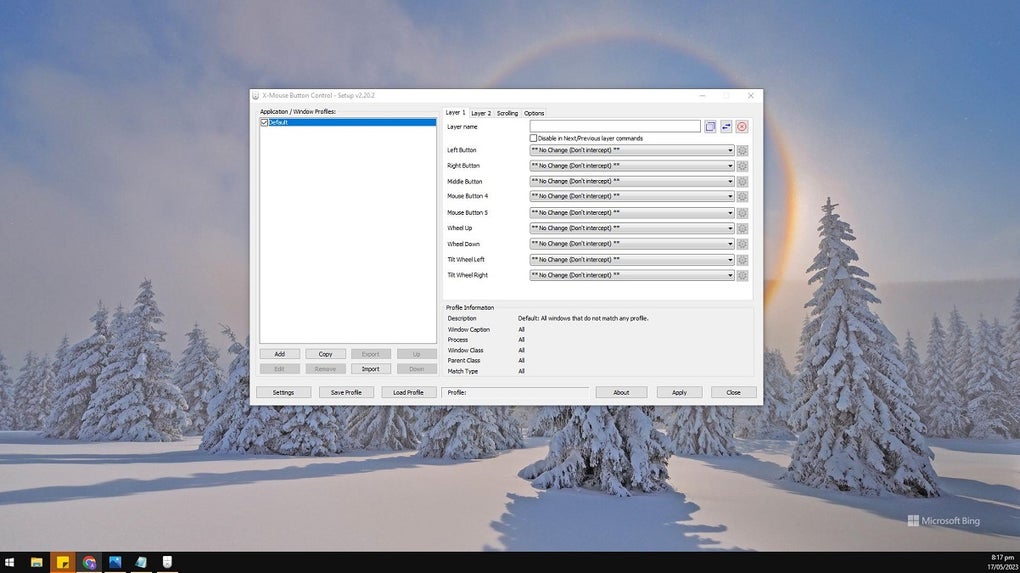
At its core, X-Mouse Button Control is a highly customizable tool that offers over 100 different actions to assign to your mouse buttons. From simple tasks like opening a specific file or launching an application to complex workflows involving simulated keystrokes, mouse clicks, and even timed actions, XMBC gives you total control. One of the most powerful features is the ability to create application-specific profiles.
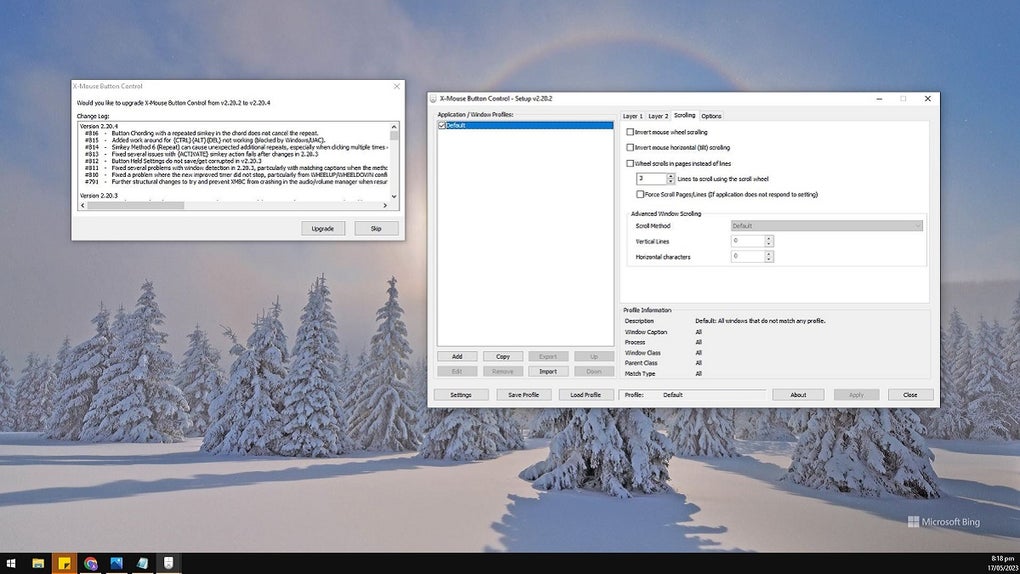
This means you can define different behaviors for the same button across different programs. For instance, the middle mouse button could minimize windows in your browser but zoom in/out in Photoshop. These profiles are managed through an intuitive interface that lists all active applications and windows, with the currently active profile highlighted in red.
Each profile can contain up to nine “layers” of button mappings, allowing you to switch between configurations using hotkeys or even additional mouse clicks. This is particularly useful for gamers who want different controls in different games or professionals juggling multiple software environments. Another standout feature is the ability to simulate keyboard input—pressing a mouse button can trigger a sequence like Ctrl+Shift+T to reopen a closed tab.
You can also set actions to trigger on button press, release, or hold duration, giving you fine-grained control over timing and response. The tool supports advanced features like sending keys continuously while a button is held, which is ideal for scrolling or dragging tasks. Additionally, XMBC supports community-translated language packs, making it accessible to users worldwide.
While the interface may seem overwhelming at first, the depth of functionality rewards users who take the time to explore its full potential.
Installation, Usage, and Compatibility Across Windows Systems
Getting started with X-Mouse Button Control is simple and hassle-free. The software is available as a downloadable installer that automatically detects your system architecture—whether you're running a 32-bit or 64-bit version of Windows. Once downloaded, simply run the executable file, accept the license agreement, and follow the on-screen prompts.
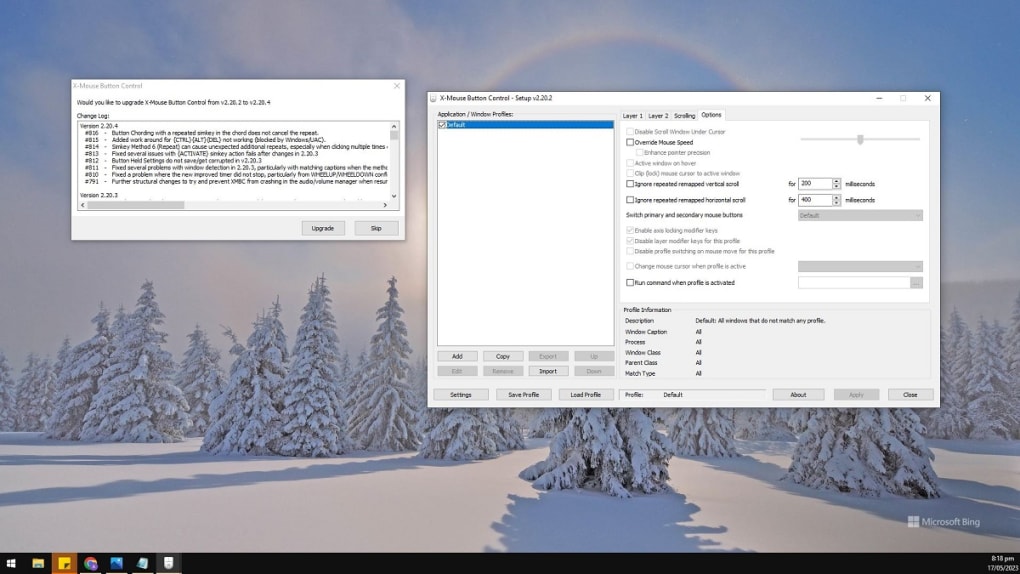
The entire process takes less than a minute. After installation, XMBC runs in the background, represented by a small icon in the system tray. To access the main configuration window, double-click the icon or right-click it to open a menu with options like “Open,” “Exit,” or “Settings.” The first time you open XMBC, you’ll be greeted by a clean, organized interface that displays a list of applications and windows, along with their associated profiles.
From here, you can create new profiles, edit existing ones, or disable unwanted mappings. The software supports a wide range of Windows operating systems, including Windows 7, 8, 10, and 11, making it a reliable choice for both legacy and modern setups. It’s important to note that XMBC is not available for Mac or Linux systems—this is a Windows-exclusive tool.
However, for Windows users, it delivers exceptional compatibility and performance. The tool is lightweight, consumes minimal system resources, and doesn’t interfere with other applications. It also integrates seamlessly with Windows’ built-in features like virtual desktops and touchpad gestures.
For users who prefer portability, a portable version is available, allowing you to run XMBC from a USB drive without installation. This is ideal for users who switch between multiple computers or want to keep their custom settings on the go. Regular updates ensure that XMBC remains compatible with new Windows updates and security patches, maintaining its reputation as a secure and reliable tool.
Pros, Cons, and Frequently Asked Questions (FAQ)
Pros
- Free and open to download with no hidden costs
- Supports Windows 7, 8, 10, and 11 (32/64-bit)
- Advanced context-aware button mapping across applications
- Over 100 customizable actions including keystrokes and macros
- Portable version available for USB use
- Lightweight and low system resource usage
Cons
- No official user guide or in-app tutorial
- Interface can be overwhelming for beginners
- Not compatible with Mac or Linux systems
- Limited support for older Windows versions beyond XP
- No built-in backup or sync for profiles
FAQ
Final Verdict: A Must-Have Tool for Windows Power Users
After thorough testing and real-world usage, X-Mouse Button Control stands out as one of the most powerful and flexible mouse customization tools available for Windows. While it may require a learning curve due to its extensive feature set and lack of built-in tutorials, the payoff is immense. Whether you're a gamer looking to gain an edge, a professional optimizing your workflow, or just someone who wants to make the most of their mouse’s side buttons, XMBC delivers unmatched control.
Its ability to create context-sensitive profiles, simulate keystrokes, and support complex macros makes it a true productivity booster. The fact that it’s completely free, secure, and regularly updated adds to its appeal. For users who value customization and efficiency, this software is a game-changer.
If you're ready to take control of your mouse, download X-Mouse Button Control today and unlock a new level of performance on your Windows PC.







